
Phase to Phase Quarterly Update
New Functionalities for your Grid Management
As always, we are continuing to improve our products, ensuring they do an even better job at helping you plan, design, and manage your power networks. Every quarter, we add new functionalities. This update brings you up to speed on this quarter’s most important improvements and shows you how they can help you enhance your grid management.

Vision Network Analysis
In addition to several minor improvements, Vision 9.11 includes new functionality that makes it possible to read in, and work with external profiles. You can now configure the system to automatically adapt the color of objects on the basis of criteria you choose yourself.
Formulier voor externe profielenExternal profiles form
Previously, you had to select external profiles on the fly in the load flow settings. Vision 9.11 now offers a ‘Profiles’ form to read in and register external profiles (you can find it under File | Prepare | Read in profiles). This gives you access to four tabs:
- Profile files – the list of profile files that you can add and remove. This list is stored in the network file.
- Measurement files – the measurement files for the data-driven load flow. This list is similarly stored in the network file.
- Profiles – read profile files into memory here and connect them to objects. After they have been read in, a list will appear containing information on the profiles.
- Times – this tab allows you to test what times appear in the profiles that have been read in. These are the times that will also be calculated during the load flow.
We’ve added a button in the load flow settings form to open the Profiles form.
Adapting object color on the basis of further specifics
‘Further Specifics’ have an important function in Vision. Information that cannot be entered in the boxes of an object can be added in the ‘Further Specifics’ tab of that object. Enter a feature and assign a value to this feature in this tab. In Vision 9.11, you can use these feature values to automatically give objects a color that you choose yourself.
In the past, you could choose certain colors via Image | Display Everything | Adapt Display, Color, Object Color. But now the ‘Custom’ option has been added to the ‘Object Color’ list, followed by a combo box allowing you to choose your own color display. The features, feature values, and accompanying colors can be configured through Options: Editor, Display, Custom.
Why this is important
External profiles and ‘real-life’ measurement files allow Vision users to perform reliable, realistic network calculations. And the new ‘Profiles’ tab makes using external profiles and managing the underlying files much easier. The dynamic color indications help you visualize the features of objects even more clearly.
Check out all the details on the What’s new page:
Gaia LV Network Design
Grid load peak moments choice expanded
Gaia calculates the peak moments of grid load using stochastic load flow. You can do this across the grid and for each individual direction/downstream mains cable. Low-voltage grid models sometimes contain several medium- or low-voltage transformers (for example during low-voltage grid design or a neighborhood-oriented approach to network analysis). In that case, the peak moments per distribution station are important. Gaia 8.11 now offers the possibility to determine peak moments per distribution station.
Calculating sleeve shock protection
Sleeves cannot be touched as a matter of principle. Short-circuits on sleeve connection are always performed, but sleeve shock protection is not normally evaluated. And yet sometimes you may want to evaluate sleeve shock protection. Gaia 8.11 now gives you the option to perform a shock protection calculation for sleeves.
Why this is important
The new functionalities of Gaia 8.11 give you greater control over the potential load on your low-voltage networks and the shock protection of network components.
Check out all the details on the What’s new page:
Vision Cloud Solution
The latest Vision Cloud Solution release contains the ‘Network Improver’. You can use this to ‘improve’ a low-voltage network model using an optimization algorithm. In this first version of the Network Improver, the algorithm is equipped to improve shock protection. The algorithm will attempt, through intensive calculation, to reduce the number of unsafe connections by adapting fuses and cable diameters. We invite you to experiment with this and share your findings with us, as we will be using your feedback to improve the Network Improver even further and ensure it fully meets your expectations.
We have also included a number of other improvements and fixes in this release.
Cable shock protection
VCS always assigned a shock protection result to cables, which was determined through the sleeves on either end. We have now made this shock protection evaluation and the accompanying color optional. The standard configuration for this option can be set on the company configuration page.
Network filter
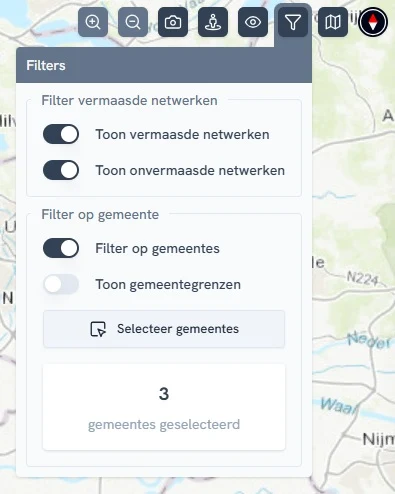
A new ‘Filters’ button has been added to the top right of the map display. You can use this to filter the networks that are visible on the map. The buttons on this display can be used to select or deselect meshed or unmeshed networks and to filter municipalities selected.
Why this is important
Our goal in implementing these new functions is to improve the support that Vision Cloud Solution offers for calculating, analyzing, and evaluating your medium- and low-voltage networks.
Check out all the details in the What’s new page:
Vision Grid Navigator
We have rebuilt Vision Grid Navigator from scratch. The application now offers a strongly improved user interface, a quicker graphical engine, and more tailor-made options.
Stay informed
Want to be kept informed quicker of future new features in our solutions? Sign up for our newsletter or follow us on LinkedIn for regular updates on releases, applications, and practical examples.
Published: 5 January 2026